
Listen
In every piece, the shō, hichiriki, ryūteki, biwa, koto, kakko, shōko and taiko are synthesized by this app. These are not recordings.
Etenraku 越天楽 · 平調
The best-known classical piece of gagaku, in a version transcribed with this app.
About 1:43. All 24 bars are transcribed for shō, hichiriki, ryūteki, biwa, kakko, shōko and taiko (no koto part).Wakatake 若竹 · 双調
A bright, lively melody that speeds up section by section and settles at the end.
About 0:53. An original piece written for this app (not a classical piece).Asagasumi 朝霞 · 壱越調
Begins slowly, gradually speeds up, and relaxes in the final bar.
About 1:24. An original piece written for this app (not a classical piece).See each instrument's characters and pitches in Ichikotsu-chō
Tsukikage 月影 · 黄鐘調
The prelude is played calmly by shō and ryūteki alone; everyone joins from bar 5.
About 1:09. An original piece written for this app (not a classical piece).Shimoyo 霜夜 · 盤渉調
The stillness of a winter night, in a melody that keeps returning to the tonic B (Banshiki). The prelude is shō and ryūteki alone.
About 1:47. An original piece written for this app (not a classical piece).See each instrument's characters and pitches in Banshiki-chō
Hanaikada 花筏 · 太食調
A bright ryo melody on the tonic E, like petals drifting on water. It relaxes slightly at the end.
About 1:19. An original piece written for this app (not a classical piece).See each instrument's characters and pitches in Taishiki-chō
Program gagaku (DTM) in its own notation
Gagaku Score Player is software for typing in gagaku pieces and playing them back. In ordinary DTM, you load a gagaku sample library into a DAW and translate the music into staff notation or a piano roll. With this app, you type the shō chord names, the hichiriki and ryūteki characters, the biwa frets and the koto string names exactly as they appear in a gagaku score. That alone plays them as an ensemble of shō, hichiriki, ryūteki, biwa, koto, kakko, shōko and taiko.
All sounds are synthesized inside the app, so you do not need to buy a DAW or sample library. It automatically adds performance techniques unique to gagaku, such as the shō's finger changes (手移り), the hichiriki's pitch bends (塩梅), the biwa's sweeps (掻撥) and the kakko's rolls (来). Use it to check your transcriptions, to hear each part within the ensemble, or for gagaku practice and study. Export your pieces as WAV files to use in other DTM software or in videos.
Features
- Shō 笙
- Hichiriki 篳篥
- Ryūteki 竜笛
- Biwa 琵琶
- Koto 筝
- Kakko 鞨鼓
- Shōko 鉦鼓
- Taiko 太鼓
Type the notation as is
Write shō chords (乞 一 工 凢 …), hichiriki and ryūteki characters, biwa frets, koto strings, and percussion strokes such as 正, 来, 百 and 図 directly as text. You can also click them in from the notation palette.
Played the gagaku way
The shō keeps shared pipes sounding through chord changes (手移り), and the hichiriki joins notes with 塩梅. Repeated characters are re-articulated with a clear break. Biwa sweeps, koto 閑掻/早掻 patterns and kakko rolls (following the tempo) are reproduced too.
Six modes
Supports Ichikotsu-chō, Hyōjō, Sōjō, Ōshiki-chō, Banshiki-chō and Taishiki-chō. Each mode has its own hichiriki メリ and ryūteki メリ and ハカリ (for example, 舌 and 丄 are lowered to F# in Hyōjō, and 凢 is lowered to C in Sōjō, Ichikotsu-chō and Ōshiki-chō).
Scale and notation chart for each mode:
A score that lines up
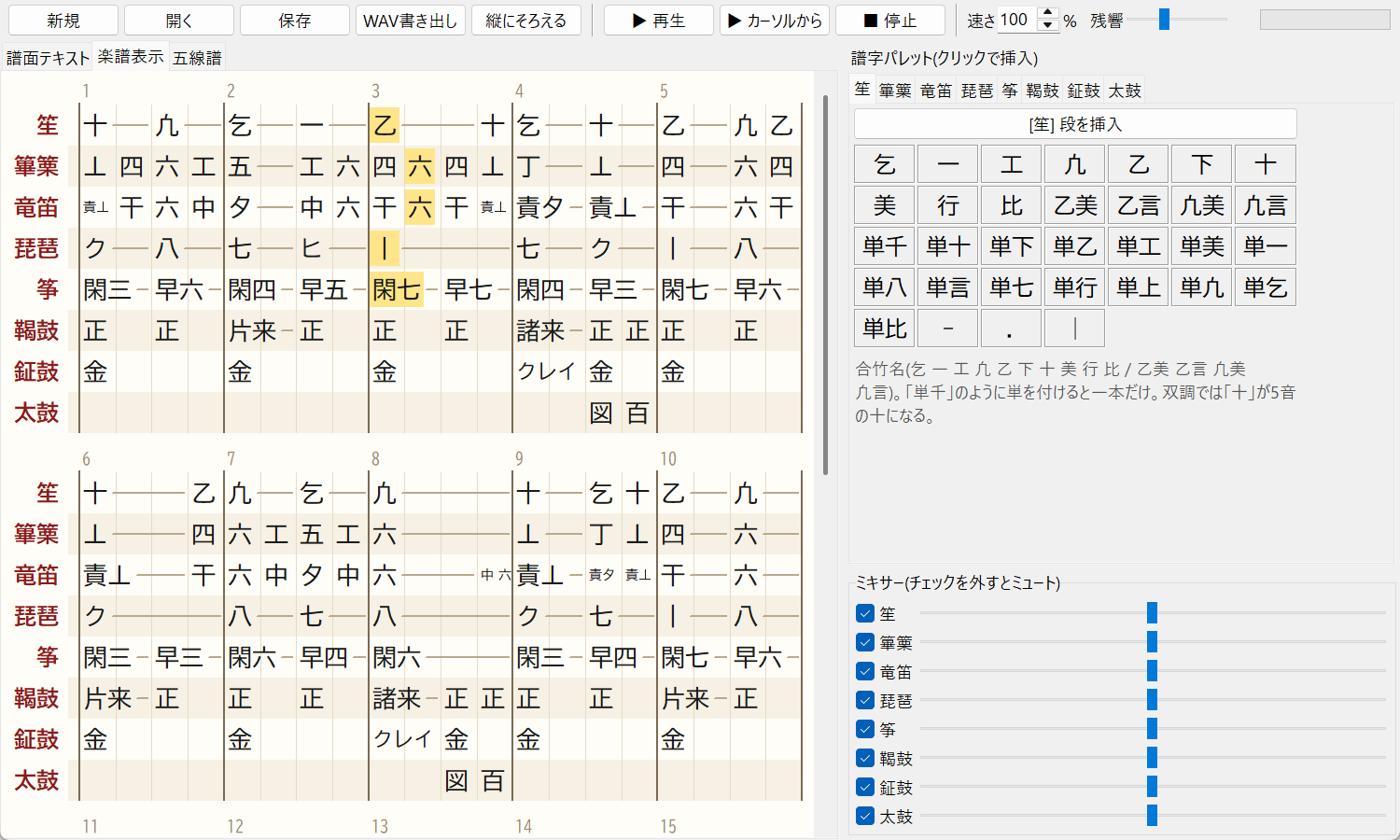
The score text is formatted automatically with five bars per system, all instruments stacked and the beats aligned vertically.
Score view and staff notation
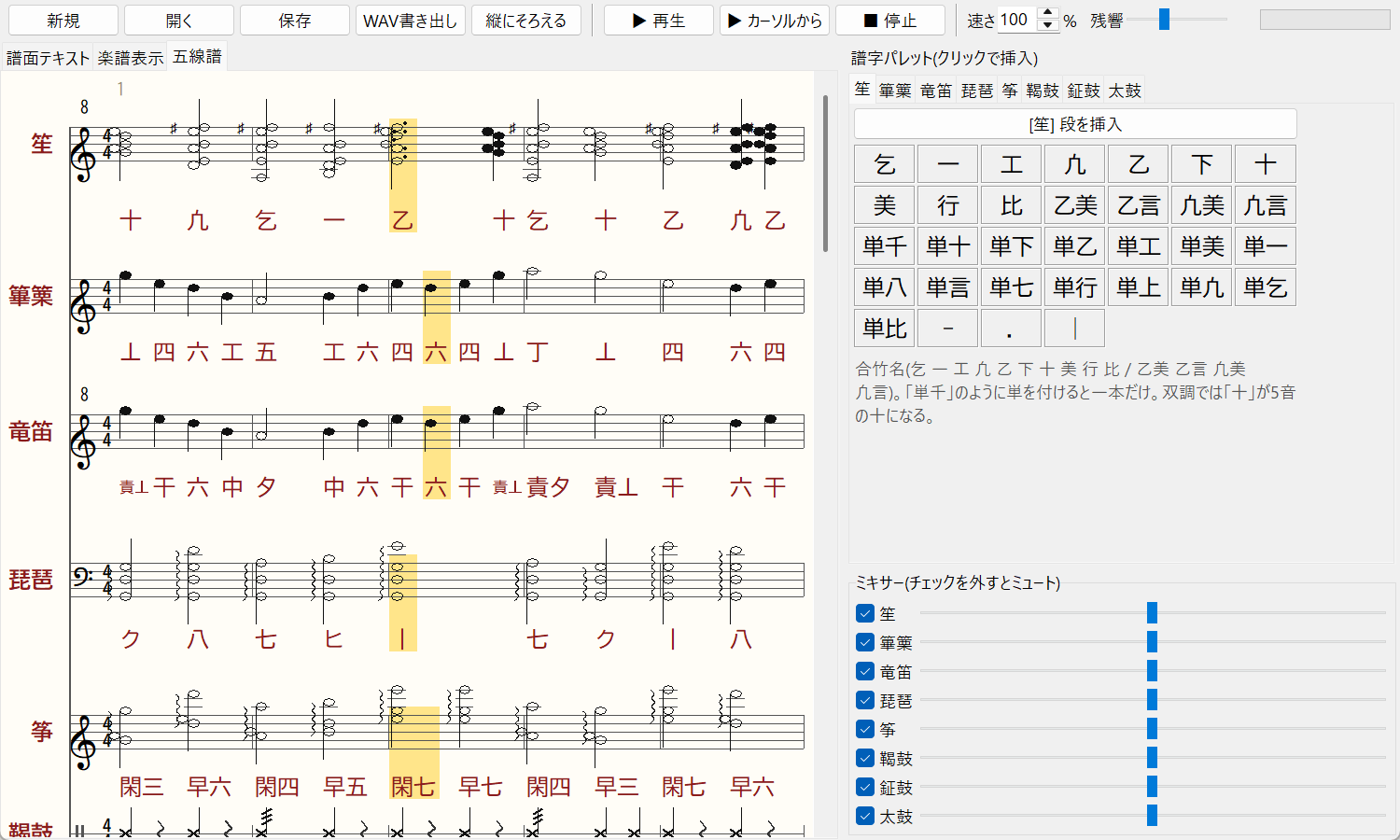
Shows a full score with aligned beats and a Western staff score with the gagaku characters under the notes. The sounding notes are highlighted during playback.
Tempo changes and WAV export
Write gagaku's gradual accelerations with tempo=. Export the performance as a WAV file.
Meter and ma between bars
Change the beats per bar in the toolbar to re-bar the score and notation. Turn on "ma between bars" (小節の間) to pause at the end of each bar while the sounding notes are sustained.
Plugins
Search for plugins from the Plugins menu, install them, and turn them on or off at any time. The "English UI" plugin switches the app to English, shows notation buttons as Ichi(一) and adds pop-ups with readings and pitches.
Biwa sweeps and double stops
Biwa sweeps start just before the beat so that the target note lands exactly on it. Write 一+ク to strike different strings together.
Recent updates
- Listening samples — added Shimoyo (Banshiki-chō) and Hanaikada (Taishiki-chō), so there is now a piece in every mode. Etenraku (with an updated transcription) and the other pieces were re-rendered with the latest sound and メリ/ハカリ.
- Charts for all six modes — scale and notation charts with each instrument's characters, pitches and メリ/ハカリ techniques for Ichikotsu-chō, Hyōjō, Sōjō, Ōshiki-chō, Banshiki-chō and Taishiki-chō (open them from "Six modes" under Features).
- メリ and ハカリ in Banshiki-chō, Ichikotsu-chō, Taishiki-chō and Ōshiki-chō — 凢 becomes C (Shinsen) in Ichikotsu-chō and Ōshiki-chō (メリ凢 on the hichiriki, ハカリ and メリ on the ryūteki) and C# (Kamimu) in Banshiki-chō and Taishiki-chō. In Taishiki-chō the hichiriki's 舌 and 丄 get no メリ and bend slightly upward; in Banshiki-chō and Ōshiki-chō they sink toward F# and A. The ryūteki pulls sharp notes down to pitch, and in Ōshiki-chō drops just before descending to the tonic A (夕) (in the pip release from 0.5.0).
- メリ and ハカリ in Sōjō — the hichiriki plays 凢 as メリ凢 on C5 and sinks smoothly when descending from 四 or 六 to the tonic 舌. The ryūteki lowers 丅 to C6 with ハカリ and メリ, holds 五 slightly flat (sliding toward F when long), and drops 夕 in steps just before 丄 or 六 (in the pip release from 0.5.0).
- Hyōjō scale chart — a new chart page lists, for each pitch of the Hyōjō scale, the characters and pitches of the shō, hichiriki, ryūteki, biwa and koto, plus the Hyōjō メリ and ハカリ techniques.
- Ryūteki メリ and ハカリ in Hyōjō — 五 and 丅 start slightly sharp and are pulled down to pitch, and the low 干 lands smoothly. 六 as a passing note dips (メル), and a held 夕 falls in steps or slides down (in the pip release from 0.4.0).
- Hichiriki メリ in Hyōjō — 凢 is fitted to the mode's C#5 (メリ凢). 舌, 丄, 凢 and 四 dip at the start of the note before rising, and 六 sinks smoothly where it meets 工 or 五 (in the pip release from 0.4.0).
- Sound — more breath noise for the ryūteki and hichiriki, and a breathier, less glassy ryūteki. The biwa has a stronger pluck and a shorter decay (in the pip release from 0.4.0).
- Japanese pop-ups — a plugin that keeps the Japanese interface and adds pop-ups with each character's reading, position (such as biwa string and fret) and pitches. It is in the online catalog, so you can find and install it from the plugin manager in 0.3.0 without updating.
- Plugins — search the online catalog, install plugins and enable or disable them from Plugins → Find and manage plugins. The first plugin, "English UI", switches the interface to English and adds pop-ups with each character's reading, Japanese spelling and pitches (in the pip release from 0.3.0).
- Ma between bars — a mode that pauses at the end of each bar and sustains the sounding notes (header
ma:). - Beats per bar — changing the beats per bar in the toolbar re-bars the score text, score view and staff (header
beats:). - Hold lengths — write
-:2or-:1/2to hold a note for a given number of beats. - Biwa — added
一+クfor striking different strings together. Sweeps now "land" on the beat: the target note (last string) sounds exactly on the beat, and the earlier strings are played ahead of it, dividing the time before the beat equally. - Hichiriki and ryūteki — repeated characters are re-articulated with a clear break. The hichiriki's fundamental is stronger, making its pitch easier to hear. In Hyōjō, 丄 is now lowered (メリ) as well as 舌.
- Kakko — rolls (片来, 諸来) are slower and their speed follows the tempo.
- Bug fixes — the score pane could be hidden at startup; opening a file while the score view or staff tab was shown left the previous score displayed.
These updates are included in the pip release 0.5.0 (published October 18, 2026; the landing biwa sweep is new in 0.2.1, plugins in 0.3.0, the Hyōjō メリ/ハカリ and sound changes in 0.4.0, and メリ/ハカリ for the other modes in 0.5.0). If you already have it installed, update with pip install -U gagaku-player.
Screenshots
Writing a score
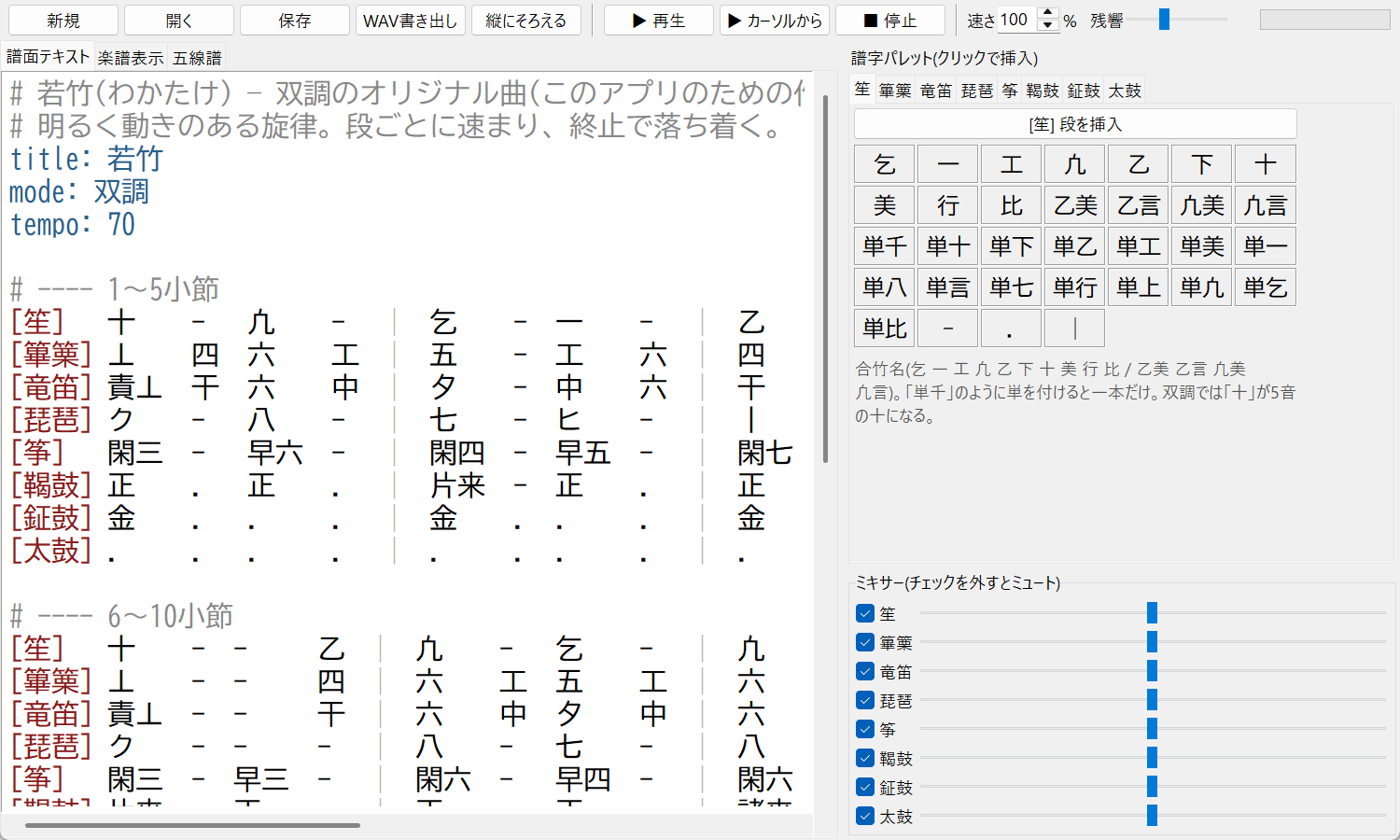
Write a header and one line per instrument in a UTF-8 text file (extension .gaku).
title: 若竹
mode: 双調
tempo: 70

[笙]   十    -   凢    -   |  乞    -  一    -   |
[篳篥] 丄    四  六    工  |  五    -  工    六  |
[竜笛] 責丄  干  六    中  |  夕    -  中    六  |
[琵琶] ク    -   八    -   |  七    -  ヒ    -   |
[筝]   閑三  -   早六  -   |  閑四  -  早五  -   |
[鞨鼓] 正    .   正    .   |  片来  -  正    .   |
| character | one beat |
|---|---|
| 譜字:2 / 譜字:1/2 | length in beats |
| - | hold the previous note one more beat (also -:2, -:1/2) |
| . | a one-beat rest (also .:2) |
| | | bar line |
| tempo=72 | change tempo from this point |
| 譜字' / 譜字, | one octave up / down (the ryūteki's high register can also be written 責六) |
| 一+ク | strike different biwa strings together |
| beats: 3 | (header) beats per bar; bars are split every this many beats |
| ma: 1 | (header) length of the ma between bars, in beats; omit for none |
See the README for the full format and the characters for each instrument.
Installation
With Python 3.10 or later, install it with pip (PyPI):
pip install gagaku-player
gagaku-player --demo
To update to a new release, run pip install -U gagaku-player.
To run from source:
- Install Python 3.10 or later.
- Download the app and unzip it (or
git clone https://github.com/ZiTengXiang/gagaku-player.git). - In the unzipped folder, run:
pip install -r requirements.txt
python main.py examples/wakatake_sojo.gaku
On Windows, playback works with nothing else installed. On macOS and Linux, playback also needs pip install sounddevice.
Pitch and tuning
The reference pitch is A4 = 430 Hz. The pitches of the shō, hichiriki and ryūteki follow published tables. No source was found for the gakubiwa and gakusō tunings in each mode, so they are provisional values built from each mode's tonic and scale (editable in gagaku/tunings.json). Techniques such as 閑掻, 早掻, 掻撥 and 来 are simplified approximations. If you know the correct tunings or techniques, please let us know in GitHub Issues.
For each mode, a chart shows which pitch each instrument's characters sound and how the メリ and ハカリ techniques bend them. Choose a mode:
FAQ
- Can I use it to program (DTM) gagaku?
- Yes. Type the notation as text and it plays as an ensemble. You can set tempo changes, beats per bar and the ma between bars, and export the result as a WAV file.
- Is it free?
- Yes. It is open source under the MIT License; you may modify and redistribute it.
- Is there a smartphone app?
- Not at the moment. It is a desktop app for Windows, macOS and Linux, and runs on Python 3.10 or later.
- Which instruments and modes are supported?
- The eight instruments of the kangen ensemble (shō, hichiriki, ryūteki, biwa, koto, kakko, shōko, taiko) and the six modes (Ichikotsu-chō, Hyōjō, Sōjō, Ōshiki-chō, Banshiki-chō, Taishiki-chō). For the characters and pitches in each mode, see the charts for Ichikotsu-chō, Hyōjō, Sōjō, Ōshiki-chō, Banshiki-chō, Taishiki-chō.
- Can I use it if I cannot read gagaku notation?
- You can click each instrument's characters in from the palette and check every note in the staff tab. Sample pieces are included, so start by listening with
gagaku-player --demo. - Are the sounds recordings?
- No, they are synthesized by the program. They are modeled on the real instruments, but differ from an actual performance.
- Is the app itself in English?
- Install the "English UI" plugin from Plugins → Find and manage plugins to switch the interface to English. The notation characters themselves stay in Japanese because gagaku scores are written that way, but each palette button shows its reading (for example Ichi(一)) and a pop-up with its pitches.
License
MIT License. You may modify, redistribute and use it commercially (keep the copyright notice).
About analytics on this site
This site uses Google Analytics, an analytics tool provided by Google, to understand how it is used. Google Analytics uses cookies and similar technologies to collect information such as the pages viewed, approximate location and browser type. The information collected does not include anything that identifies you personally, such as your name. It is handled according to Google's privacy policy.
If you do not want this information collected, disable cookies in your browser or use the Google Analytics Opt-out Browser Add-on. For details, see How Google uses information from sites or apps that use our services.